Architecture of the agentic enterprise
How model intelligence becomes useful enterprise work: the layers you own, the lifecycle every agent runs through, the capabilities you add, and the controls set along the way.
How do you turn model intelligence into useful enterprise work? Start with a task, such as checking a possible safety issue and arranging an inspection. A model and some documents can answer a question about it. Finishing the work needs more. The agent needs current information, permission to act, reliable business systems, and a person who answers for the result. This guide builds that in three parts: the layers you own, the lifecycle you run and the capabilities you add. Controls are set as each agent passes through its lifecycle. For the whole route in order, read Start here.
See the whole system first
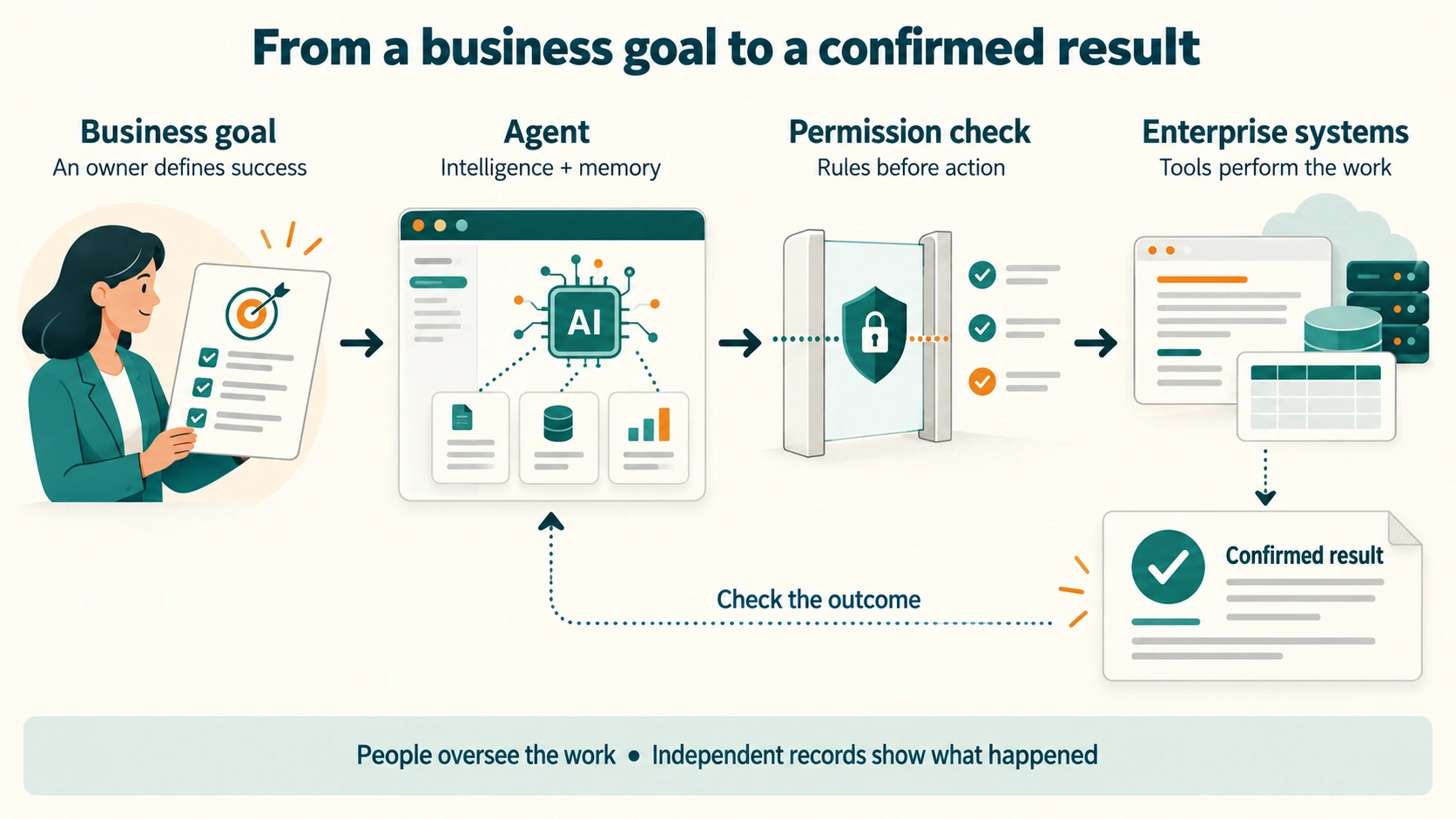
Take an agent that reviews vegetation near power lines. It needs images, the correct asset location and the inspection policy. It may ask for a closer look or propose an inspection. A separate permission check decides whether it can create the work order. The task ends with a confirmed result or a clear handover to a person.
This is a proposed design example. An image alone does not prove a safety risk. The task walkthrough follows an inspection in more detail.
The layers you own
Every agent works inside systems the company already runs. This guide groups them into fourteen layers. They run from infrastructure and compute (R01) to agent data engineering (R14). The layers hold the data, the records, the integration, the security and the people. Agents do not replace them. Agents add new demands on each one.
For intelligence, start with the intelligence and learning layer (R06) and the agent platform layer (R07). Both rest on infrastructure and compute (R01). For memory, start with the data platform layer (R02) and the agent data engineering layer (R14). All of them depend on security, governance, monitoring and the people who run the service.
Select a layer to see its role, then open the complete design. The groups help you navigate; they do not prescribe a deployment order.
Operate the enterprise
R04Systems of record
Read and change official records through checked operations.
Explore this layer →R05Business & industrial systems
Connect operational work while protecting physical actions.
Explore this layer →R08Workplace & collaboration
Let people direct work and handle exceptions in familiar tools.
Explore this layer →R13Operating model and supervision
Assign responsibility, supervision capacity, and incident ownership.
Explore this layer →Run intelligence
R01Infrastructure & compute
Run models and tasks within capacity, locality, and recovery limits.
Explore this layer →Supply knowledge
R14Data engineering for agents
Prepare, represent, retrieve, update, and remove usable evidence.
Explore this layer →Connect and control
R10Security & identity
Identify the agent and enforce the permissions of its task.
Explore this layer →R11Governance & risk
Set accountability, evidence requirements, and data-location constraints.
Explore this layer →R12Monitoring & cost
Observe quality, failures, and the full cost of completed work.
Explore this layer →Open a layer to see its role, then follow its detailed design.
The lifecycle you run
Every agent passes through nine stages: register, sponsor and owner, entitle, evaluate, approve, operate, change, periodic review and retire. Building and piloting come before stage 1. The registry record holds the agent's state: active, under review, deprecated or retired. AWS and Microsoft guidance both frame agent management as a lifecycle like this one.
The inspection agent is registered with a named sponsor before it touches a record. It is entitled to read imagery and draft work orders, and nothing more. It is evaluated on past inspections before anyone approves it. Once live, a change to its model sends it back to evaluate.
The capabilities you add
Seven capabilities let agents run safely across the layers. Three let agents work: a runtime, a tool gateway, and knowledge and memory. Four keep them in bounds: identity and policy, evaluation and release, observability and an audit trail, and human oversight. Each lifecycle stage calls on some of them.

Read the diagram around one task. A person sets the goal. The runtime runs the agent. Knowledge and memory supply the context. The tool gateway connects the agent to tools. Identity and policy limit what is allowed. Observability and audit trail record what happened. Evaluation and release test each change before it enters use.
Two rules hold the design together.
- Policy is enforced outside the model. The model never checks its own permissions. The gateway and the policy decision point do.
- The audit trail is written where the agent cannot touch it. A separate channel records calls, approvals and outcomes.
What an agent platform provides sets out each capability and the products behind it.
Connect intelligence and memory
Intelligence and memory need their own questions. How capable must the agent be for this task? What information must it have to make a supported decision?
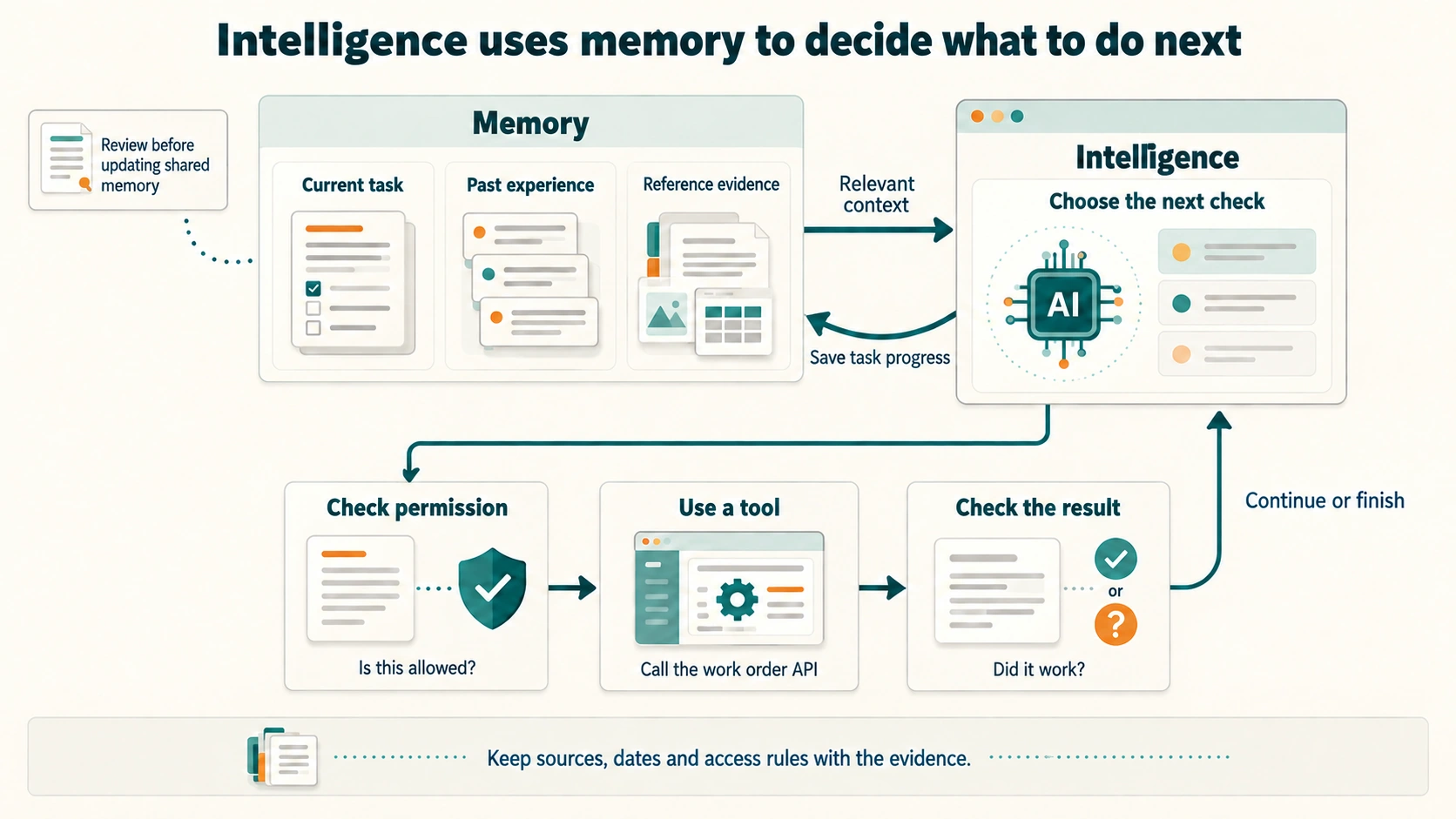
In the inspection example, thread memory tracks the location under review and the checks already done. Longer-lived memory may supply an earlier inspection, an approved procedure or a past case. The agent uses that context to decide whether it needs another observation.
Keep two kinds of evidence apart. Reference evidence supports the decision: which image, record or procedure was used, and when it applied. Execution evidence shows what happened: which tool was called, who approved it, and what the system returned. A summary written by the agent cannot replace those records.
Saving task progress is not the same as changing shared knowledge. Review proposed lasting updates for accuracy, access and freshness. Test changes to models, prompts and policies before release.
Design the intelligence
Design the memory
The controls, in order
Once the main flow is clear, set the controls for your task. Most are set at the evaluate and approve stages.
- The four questions: what the agent does, what its credentials allow, how freely it acts, and what it can damage.
- The autonomy contract: how freely it may act, and how far its behaviour may learn.
- The risk profile: score the agent to set its risk tier. The tier decides the controls.
- The deterministic zones: access, money, safety actuation and formal regulatory records. A model never approves in these.
- The delegation chain: trace every action back to the person who asked.
- Enforcement outside the model: where each check sits and who runs it.
- The learning flywheel: how a proposed improvement is tested before it ships.
Where to go next
Make software usable by agents
Compare technology choices
A company using agents inside purchased software has different control points from a team running its own agent platform. Check what each system exposes. Do not assume one gateway sees every action. The enterprise reference designs compare starting points.
Start from a business use case, or check all ten cross-cutting concerns in the concern matrix. Look up any term in plain words. Read about security threats, or apply an architecture review skill to a real design.
Evidence and limits
This is a reference design, not a product to buy. The three-part frame is this guide's own. The lifecycle stages follow AWS and Microsoft guidance closely. The capability names follow AWS, Microsoft and Google products, dated on What an agent platform provides. The inspection example is a proposed design. It is not a measured deployment.
Next step: see the seven capabilities in detail on What an agent platform provides.
Explore this topic
Cite this page
Written by Murali Sid, Founder and AI Systems Architect, last updated 15 October 2026. Licensed CC BY-SA 4.0, so quote it freely with attribution.
Murali Sid (2026). Architecture of the agentic enterprise. Agentic Architecture Skills. https://www.agenticarchitectureskills.com/architectureMachine-readable version of this page: /architecture.md