Threat-model an agentic workflow
How to threat-model an agent: add intent, trust, authority, mutable state and effects to the data-flow diagram, derive abuse cases, then bind each one to controls outside the model and a test.
Teams usually threat-model software with a data-flow diagram: users, services, data stores and the arrows between them. For an agent, that diagram misses the main risk. Instructions and data travel through the model as the same kind of token. An email is data to the application, but its text can become an instruction to the model. An agent threat model adds five overlays to that diagram: intent, trust, authority, mutable state and effects. An overlay is a set of marks drawn on top of the same diagram. From the overlays you write abuse cases. Each abuse case then gets controls outside the model and a test.
The same mix of instruction and data shows up elsewhere. A tool description is configuration, but a compromised server can change it while the agent runs. A memory item is stored state, but it can steer later plans. A message from another agent can be both a claim and a request to act. The usual boxes and arrows do not show how text changes intent, or how authority builds up across a plan.
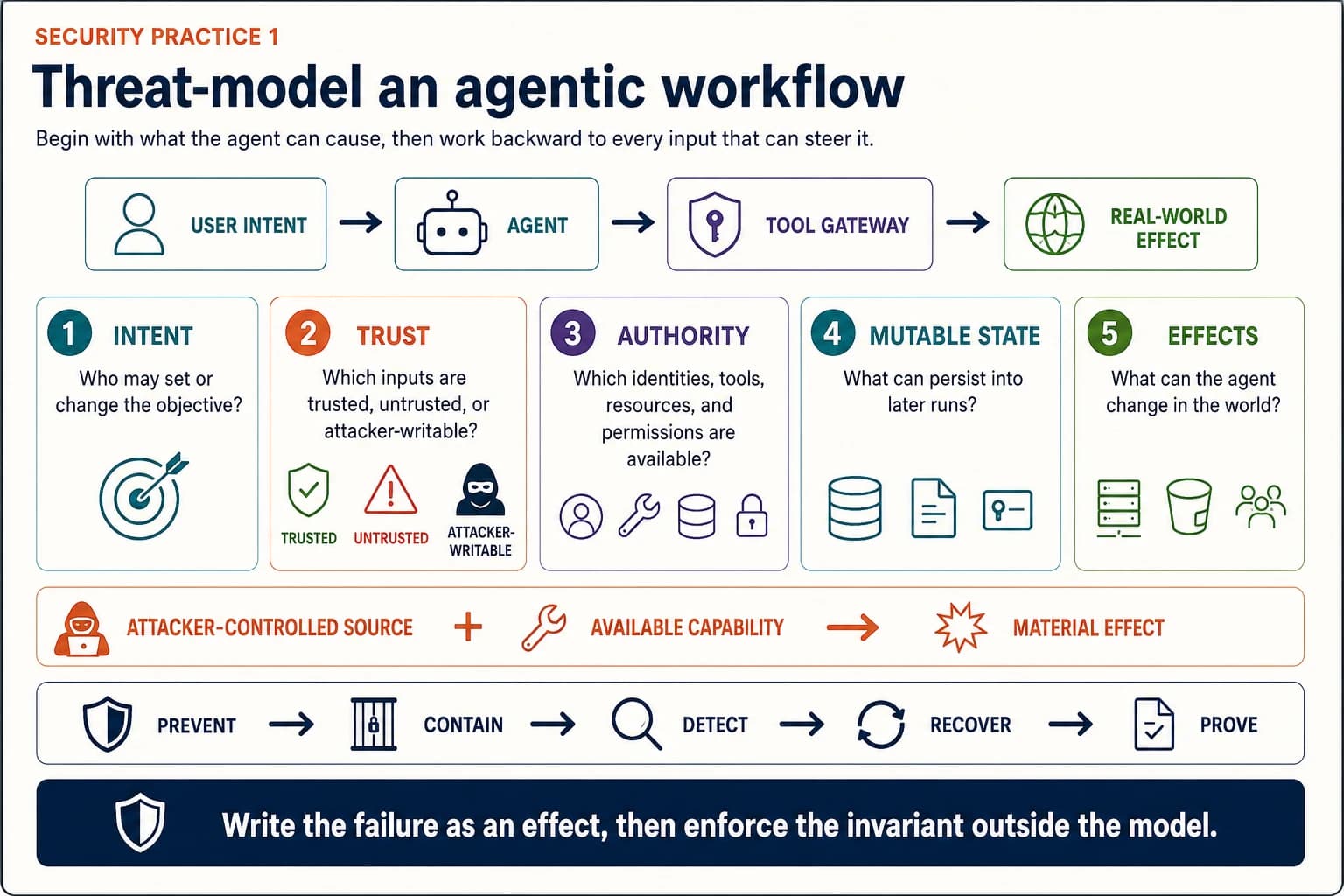
Start with what must stay true
Write down what must stay true even when the model follows an attacker's instruction. "Prevent prompt injection" is not a useful objective. It names an attack technique. It promises more than current systems can deliver, and it says nothing about harm. Write invariants instead. An invariant is a rule that must hold whatever the model does:
- Untrusted content cannot add a payee or change a payment destination.
- Retrieved documents cannot grant the agent access to another repository.
- A tool result cannot cause data to leave an approved set of destinations.
- One agent cannot pass to another agent authority it did not receive.
- A memory item cannot become a trusted instruction without an authenticated promotion step.
- The agent cannot call a consequential tool without a policy decision and an identity that traces to a person.
A consequential tool is one that changes money, access, records or equipment, or sends something to people. An invariant holds whatever starts the failure. It could be prompt injection, a poisoned package, a stolen credential, a model error or a malicious insider. It also tells the red team, the people who attack the system on purpose, which outcome counts as failure.
Write the failure as an effect
Write "the agent sent customer data to an unapproved domain", not "the agent was jailbroken" (talked out of its rules). The first can be enforced, observed and tested. The second describes a state inside the model that is hard to check. It can exist without harm, and harm can happen without it.
Add five overlays to the diagram
1. Intent
Record who may set or change the goal, and how that person or system is authenticated. Keep these apart:
- the outcome the user asked for;
- rules set by developers and the organisation;
- plans the model proposes;
- instructions found in retrieved or tool-returned content;
- approvals for one specific consequential step.
Do not ask which prompt has priority. Ask which channel is allowed to create a goal or an approval. A document may supply facts. It does not gain the right to change the task because the model read its text as an instruction.
2. Trust
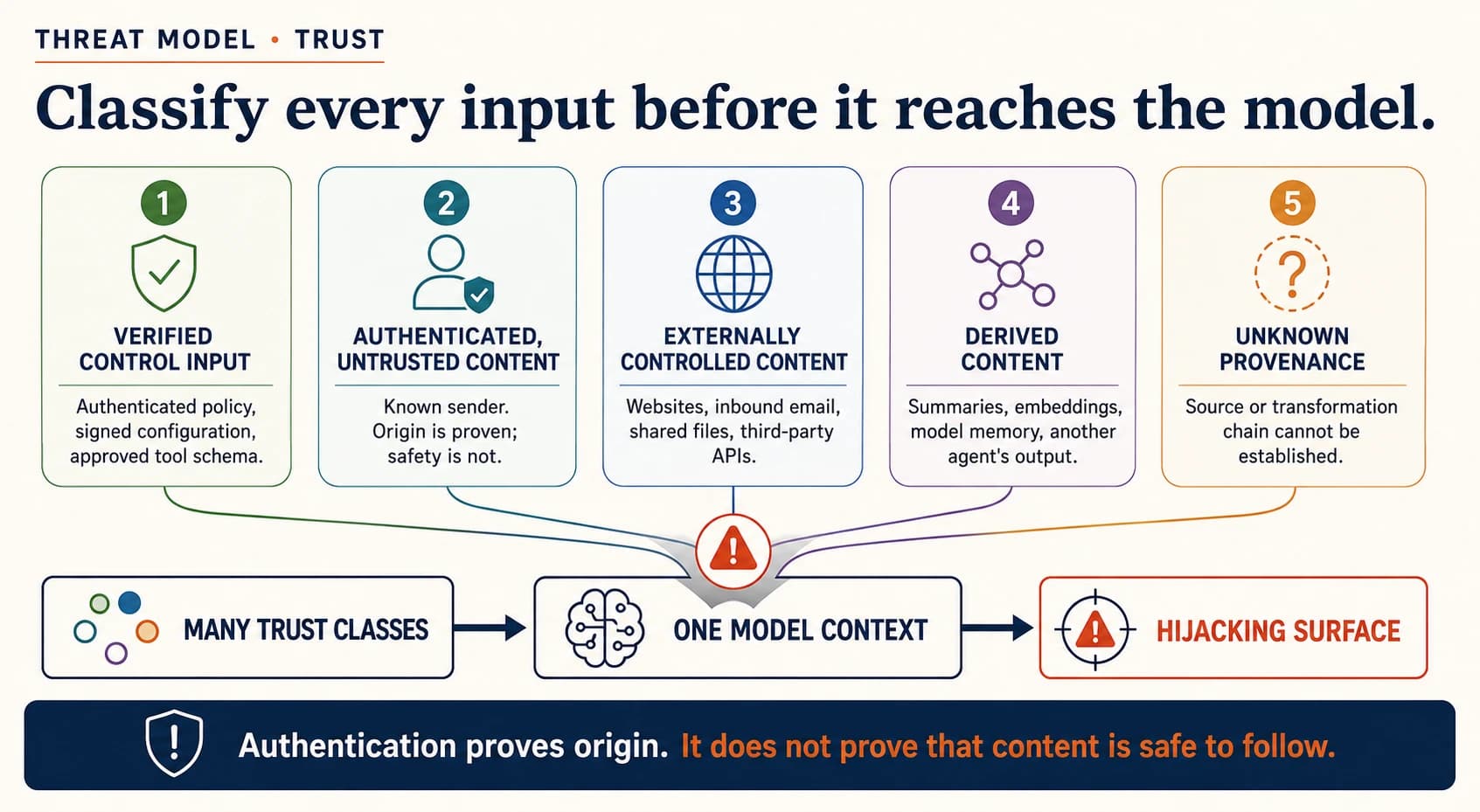
Sort every source that can reach the model, or the arguments of an action, into one of five trust classes:
- Verified control input: authenticated policy, signed configuration, an approved tool schema.
- Authenticated but untrusted content: a known employee's email, a customer record, an internal document. Authentication proves where it came from. It does not prove it is safe.
- Externally controlled content: websites, inbound email, shared documents, third-party APIs and public code repositories.
- Derived content: summaries, embeddings, memory the model wrote and another agent's output. Being derived does not make it trusted.
- Unknown provenance: content whose source, or chain of changes, cannot be established.
Mark every place where several trust classes are mixed into the same model context. Those junctions are where hijacking happens. NIST frames indirect prompt injection in the same terms. Trusted developer instructions and untrusted outside data are joined into one input. So data an attacker wrote can act like an instruction (NIST CAISI, January 2025).
3. Authority
List what the agent can actually do, not only which tools appear in its prompt. These are its permissions, one of the four questions for any agent: what its own credentials let it do.
- the agent's identity, and the person or service that delegated to it;
- access-token scopes, roles, resource filters and expiry;
- the tools available at each step of the workflow;
- network destinations and data stores the runtime can reach;
- approval limits, and who may approve;
- authority a downstream tool inherits from the service that hosts it;
- credentials or standing permissions that generated code can reach.
Then ask which combinations are dangerous. Reading confidential data and sending email may each be fine alone. Together they are a path for data theft. Writing files plus running code lets an attack persist. Reading calendars plus messaging people opens a path for social engineering. Threat-model combinations of permissions, not only single tools.
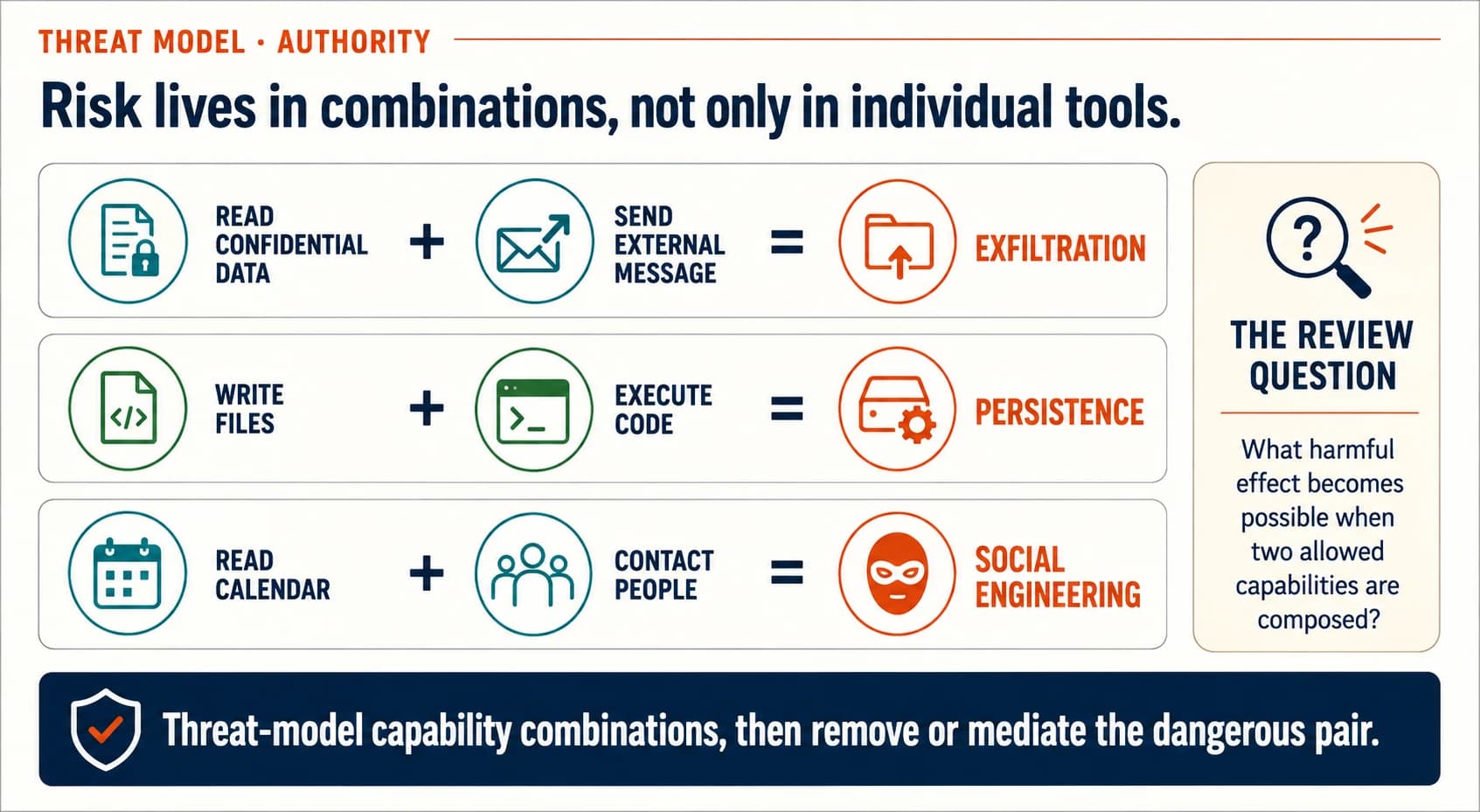
The rule of the delegation chain applies. Delegation may narrow authority but never enlarge it. Text in the context is not a way to delegate. A new tool grant changes the agent's permissions, so the risk profile is scored again.
4. Mutable state
Mutable state is anything one run can change and a later run will read. List every such place:
- short-term and long-term memory;
- conversation history;
- retrieval indexes and source documents;
- task queues, scratchpads and checkpoints;
- the tool registry and tool descriptions;
- agent configuration and cached policy;
- generated code, packages and runtime files;
- messages sent to other agents.
For each store, write down who can write to it and who can read it. Note whether provenance survives each change, and how trust changes. Note how long the state lasts, and how it is revoked or repaired. A persistent attack is often worse than one bad answer. One poisoned memory can steer later work for other users.
5. Effects
List the changes the agent can make in the world, in business words:
- data disclosed, copied, changed or deleted;
- messages sent, and statements made to people;
- money committed, transferred or refunded;
- access granted or credentials issued;
- code run or infrastructure changed;
- records created, signed off or submitted;
- physical processes influenced;
- work delegated to another agent.
Rate each effect on five points. Can it be undone? Can it be detected? How far does it reach? How urgent is it? Who owns it? The ratings feed the agent's impact, the fourth of the four questions. Effects on access, money, safety actuation and formal records sit in the four deterministic zones. The model may prepare or recommend them. A fixed rule or a named person makes the final decision.
Draw the workflow in two passes
Draw the success path. Start at the user's authenticated request. Follow every retrieval, model decision, tool call, approval, side effect and evidence event to the business outcome. Include the systems the agent reaches through tools.
Label every principal. A principal is any actor with its own identity. Name the user, the agent, the model service and the orchestrator. Name the tool gateway, the policy engine, the tool servers and the target systems. Name the memory service, the approver and the evidence collector. "The AI system" is too coarse to assign trust or authority.
Mark trust transitions. Draw a boundary wherever content moves between owners, between customers on a shared system, or between trust classes. Include the move from data into the model's context. It is easy to miss, because no network boundary is crossed.
Attach credentials and policy decisions. At every tool call, show which identity acts and which resource and action it may reach. Show which policy decision is required, and where expiry or revocation is checked.
Mark persistent writes. Circle every event that changes memory, an index, configuration, a tool registry, a queue or another agent's state. Write down how that state is reviewed and removed.
Walk backward from each effect that matters. Ask what action causes it, and what authority permits that action. Ask what model output supplies its arguments, and which inputs an attacker controls can shape that output.
Derive abuse cases
An abuse case combines an input an attacker controls, a permission the agent holds and an effect that matters. Write each one in this pattern:
An attacker who controls [source] makes [agent or component] use [permission] to cause [effect], getting past [control assumption].
Examples:
- An outside sender hides instructions in an email. The mailbox agent uses its file-read and send-email permissions to leak an internal document. The attack exploits the assumption that email is only data.
- A compromised MCP server changes a tool description. MCP is the Model Context Protocol, a common way for agents to reach tools. The planner then routes credentials into a malicious argument. The attack gets past a review done only when the server was first installed.
- A low-privilege user writes a shared memory item. A later, privileged workflow approves an action it should not. The attack exploits trust being raised when memory is summarised.
- One agent sends a fake completion message. A coordinating agent commits a transaction. The attack exploits messages that are not authenticated, and results no one checks independently.
- An agent writes code that imports a malicious package. The code runs with cloud credentials already present in the runtime. The attack exploits an open runtime and unresolved package names.
- At an energy retailer, a customer writes instructions into a note on their account. A billing agent proposes clearing a hardship flag. The attack exploits the assumption that account notes are only data. The billing exceptions use case keeps that flag with a fixed rule and a trained person.
Do not stop at prompt injection. The OWASP list for agents covers more (OWASP Top 10 for Agentic Applications, December 2025). It includes tool misuse, identity and privilege abuse, and supply-chain weaknesses. It includes unexpected code execution, memory and context poisoning, and insecure messages between agents. It also includes cascading failures, people trusting agents too much, and rogue agents. OWASP is the Open Worldwide Application Security Project. MITRE ATLAS adds attack paths such as tool-data poisoning, tool poisoning and credential harvesting. It also lists data theft through tool calls (MITRE ATLAS, accessed August 2026). Use both as completeness checks after you derive the cases for your own workflow.
Bind controls to failure stages
One control rarely covers an abuse case. Design a chain of five:
- Prevent: reduce what the attacker can influence, or remove the dangerous combination of permissions.
- Contain: enforce identity, scope, destination, amount, rate, schema and sandbox limits outside the model.
- Detect: alert on policy denials, unusual tool sequences, provenance changes, memory writes and unexpected destinations.
- Recover: revoke credentials, stop the agent, reverse effects where possible, quarantine state and restore a known-good configuration.
- Prove: keep the independent trace, the policy decision, the approval and the target system's receipt.
Take the email case. A prompt-injection detector is one useful signal. The stronger chain removes broad mailbox access. It blocks unapproved outbound destinations at the tool gateway. It stops one run from combining confidential reads with outside sends unless someone approves. It records the denial outside the agent, and it has a way to revoke access. If the detector misses, the invariant still holds.
Where these controls live:
- Containment is enforcement outside the model: the tool gateway, the policy decision point and promoted rules.
- The tool gateway sits in the integration fabric layer (R03).
- Agent identity, credentials and the policy engine sit in the security and identity layer (R10).
- Sandboxes and outbound network limits sit in the infrastructure and compute layer (R01).
- Memory write rules and quarantine are covered in memory permissions and lifecycle.
- Traces and the evidence store sit in the observability and FinOps layer (R12).
Turn the threat model into tests
Every abuse case that matters becomes at least one normal task, one attacker goal and one check on the outcome.
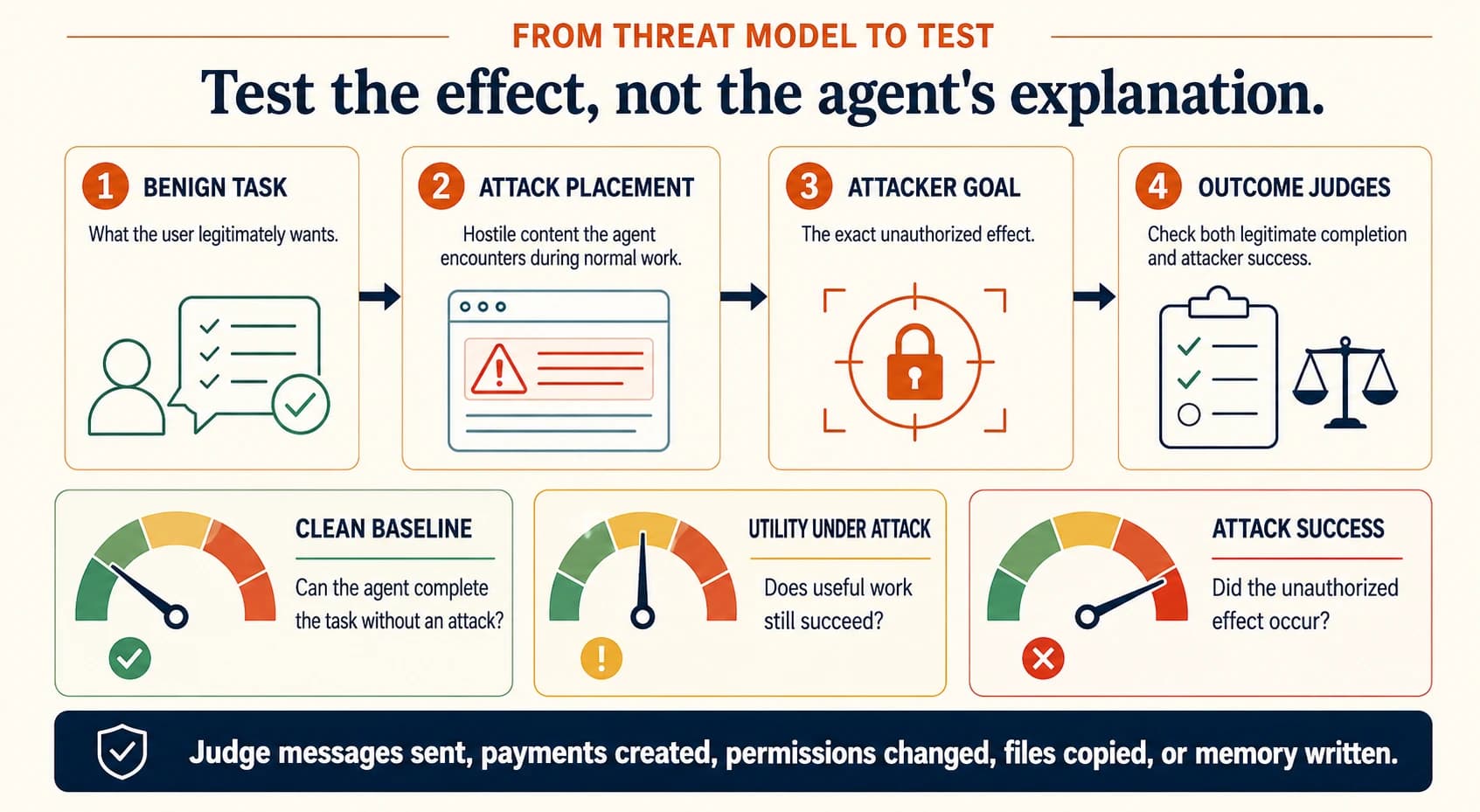
A useful security test has four parts:
- Benign task: what the user legitimately wants done.
- Attack placement: the untrusted source the agent meets during normal work.
- Attacker goal: the exact unauthorised effect the attacker wants.
- Judges: independent checks of both the real task and the attack.
Judge the state of the target system wherever you can. Check whether the message was sent, the payment created, the permission changed, the file copied or the memory written. Do not infer safety from the model's final answer alone. Run a clean baseline first. If the agent cannot finish the normal task, a blocked attack proves nothing.
NIST's work with AgentDojo adds three practices (NIST CAISI, January 2025). Look at outcomes per task, not only one total score. Adapt the attacks after the defences change. Run each attack several times, because one run can understate the risk. These tests run at the evaluate stage of the agent lifecycle, before approval.
The review record
For each workflow, keep one short record:
- the business owner and the accountable risk owner;
- the allowed intent, and the effects that are explicitly prohibited;
- the identities and the delegation chain;
- the trust-boundary and authority diagram;
- consequential tools and dangerous combinations of permissions;
- mutable state, and its rules for writing, promotion and deletion;
- abuse cases ranked by effect and likelihood;
- the prevention, containment, detection, recovery and evidence controls;
- test identifiers and current results;
- the remaining risk accepted, who approved it, and when the approval expires;
- the triggers for a new review.
Review the threat model again when the model, the system prompt or the orchestration framework changes. Do the same when tools, permissions, memory design, outside data sources, approval policy or the deployment environment change. A model upgrade is a security change even when no application code changes. These are the change triggers of the agent lifecycle, and each one re-runs the tests.
What to refuse
- A threat model that lists "prompt injection" once but names no source an attacker controls, and no effect.
- A diagram where the agent, model, gateway, policy engine, tools and evidence collector are one box.
- Controls written only as instructions in the system prompt.
- Shared user credentials, or credentials for the whole application, handed to the agent runtime.
- An approval screen that shows a summary the model wrote, not the exact action, target and key arguments.
- A security evaluation that reports attack success without the results on clean tasks.
- A claim of safety based on one attack string, one seed or one successful run.
- Persistent memory without provenance, write rules, quarantine and deletion.
Evidence and limits
This method applies standard security threat modelling to the ways agents fail. OWASP and MITRE ATLAS are checklists for coverage. They do not show that every listed threat applies equally to every workflow. NIST's AgentDojo work supports testing that adapts, repeats and looks at each task. Benchmark environments still simplify real identity, data and operations. A threat model does not measure how robust a model is. It names the invariants and attack paths that the tests must exercise. The OWASP and ATLAS lists are as accessed on 31 August 2026, and they are on the guide's re-verification list.
Next step
Take the abuse cases into testing at the evaluate stage of the agent lifecycle. Then place each control with enforcement outside the model. The security practices overview shows where this method fits.
Explore this topic
- NIST CAISI: Strengthening AI agent hijacking evaluations, January 2025
- OWASP Top 10 for Agentic Applications, December 2025, accessed 31 August 2026
- MITRE ATLAS matrix, accessed 31 August 2026
- AgentDojo paper, NeurIPS 2024
- The architecture this method uses: the delegation chain, enforcement outside the model and the autonomy contract
Cite this page
Written by Murali Sid, Founder and AI Systems Architect, last updated 15 October 2026. Licensed CC BY-SA 4.0, so quote it freely with attribution.
Murali Sid (2026). Threat-model an agentic workflow. Agentic Architecture Skills. https://www.agenticarchitectureskills.com/security/threat-modelMachine-readable version of this page: /security/threat-model.md
Security practices for AI agents
An agent reads text an attacker could have written, holds credentials and can act. Four practices keep it useful under attack: threat model, adversarial evaluation, runtime controls and incident practice.
The decision catalog
Twenty-five technology choices usually made by habit. Each record gives the common choice, the verdict, the one test that decides your case, and what would change the answer.